Home › All rules › Community › Pcf Events Copilot Instructions
Pcf Events Copilot Instructions
Define and handle custom events in PCF components
GitHub CopilotAny stackCommunity (MIT)
How to use
Save this as .github/instructions/pcf-events.instructions.md in your project, commit it, and GitHub Copilot will apply it to matching files. Review it first: community files can be opinionated or out of date.
Note: Review and test before use. Provided as is, without warranty. See Terms.
.github/instructions/pcf-events.instructions.mdDownload ---
description: 'Define and handle custom events in PCF components'
applyTo: '**/*.{ts,tsx,js,json,xml,pcfproj,csproj}'
---
# Define Events (Preview)
[This topic is pre-release documentation and is subject to change.]
A common requirement when building custom components with the Power Apps Component Framework is the ability to react to events generated within the control. These events can be invoked either due to user interaction or programmatically via code. For example, an application can have a code component that lets a user build a product bundle. This component can also raise an event which could show product information in another area of the application.
## Component Data Flow
The common data flow for a code component is data flowing from the hosting application into the control as inputs and updated data flowing out of the control to the hosting form or page. This diagram shows the standard pattern of data flow for a typical PCF component:
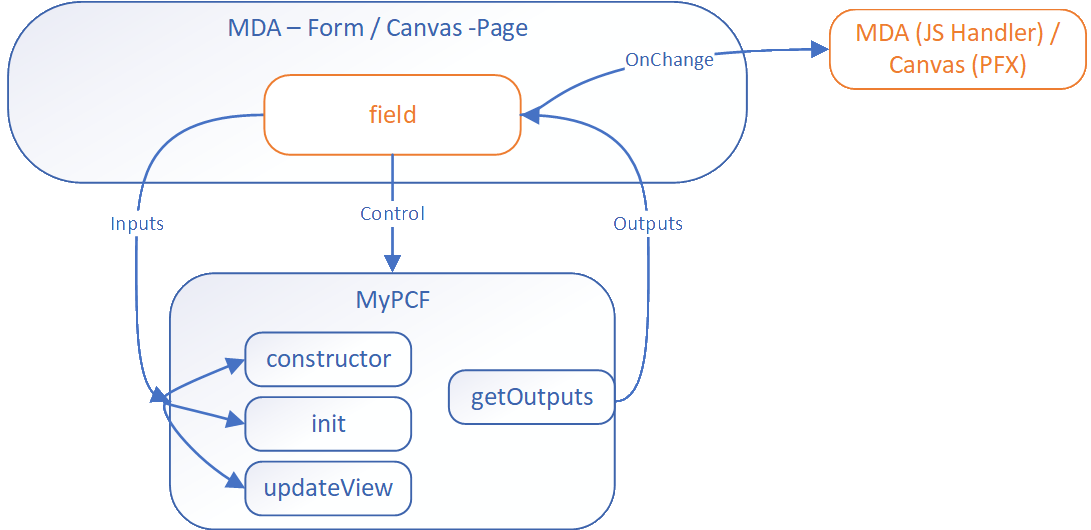
The data update from the code component to the bound field triggers the `OnChange` event. For most component scenarios, this is enough and makers just add a handler to trigger subsequent actions. However, a more complicated control might require events to be raised that aren't field updates. The event mechanism allows code components to define events that have separate event handlers.
## Using Events
The event mechanism in PCF is based on the standard event model in JavaScript. The component can define events in the manifest file and raise these events in the code. The hosting application can listen to these events and react to them.
### Define Events in Manifest
The component defines events using the [event element](https://learn.microsoft.com/en-us/power-apps/developer/component-framework/manifest-schema-reference/event) in the manifest file. This data allows the respective hosting application to react to events in different ways.
```xml
<property
name="sampleProperty"
display-name-key="Property_Display_Key"
description-key="Property_Desc_Key"
of-type="SingleLine.Text"
usage="bound"
required="true"
/>
<event
name="customEvent1"
display-name-key="customEvent1"
description-key="customEvent1"
/>
<event
name="customEvent2"
display-name-key="customEvent2"
description-key="customEvent2"
/>
```
### Canvas Apps Event Handling
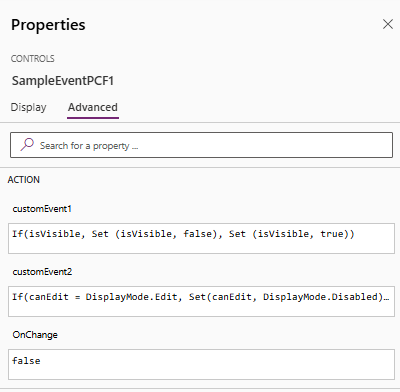
Canvas apps react to the event using Power Fx expressions:
### Model-Driven Apps Event Handling
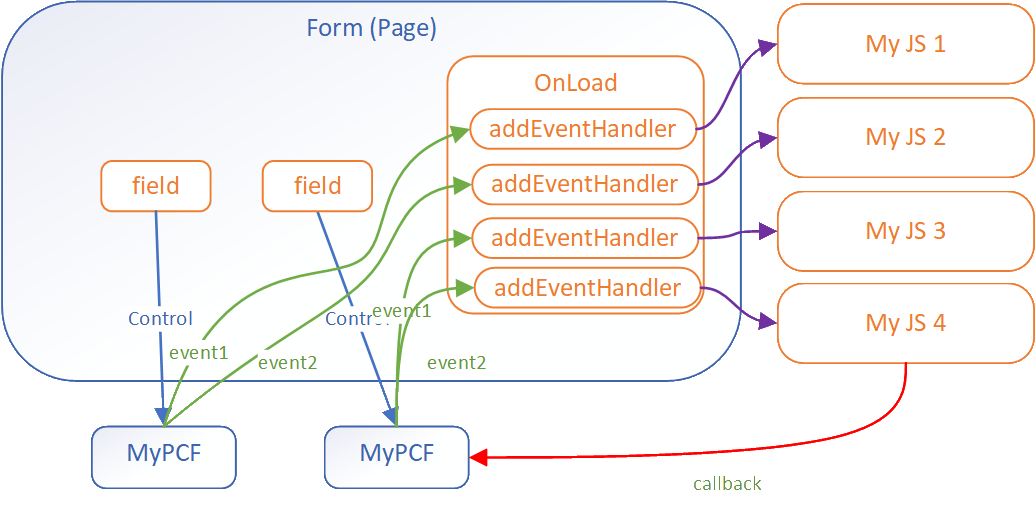
Model Driven Apps use the [addEventHandler method](https://learn.microsoft.com/en-us/power-apps/developer/model-driven-apps/clientapi/reference/controls/addeventhandler) to associate event handlers to custom events for a component.
```javascript
const controlName1 = "cr116_personid";
this.onLoad = function (executionContext) {
const formContext = executionContext.getFormContext();
const sampleControl1 = formContext.getControl(controlName1);
sampleControl1.addEventHandler("customEvent1", this.onSampleControl1CustomEvent1);
sampleControl1.addEventHandler("customEvent2", this.onSampleControl1CustomEvent2);
}
```
> **Note**: These events occur separately for each instance of the code component in the app.
## Defining an Event for Model-Driven Apps
For model-driven apps you can pass a payload with the event allowing for more complex scenarios. For example in the diagram below the component passes a callback function in the event allowing the script handling to call back to the component.
```javascript
this.onSampleControl1CustomEvent1 = function (params) {
//alert(`SampleControl1 Custom Event 1: ${params}`);
alert(`SampleControl1 Custom Event 1`);
}.bind(this);
this.onSampleControl2CustomEvent2 = function (params) {
alert(`SampleControl2 Custom Event 2: ${params.message}`);
// prevent the default action for the event
params.callBackFunction();
}
```
## Defining an Event for Canvas Apps
Makers configure an event using Power Fx on the PCF control in the properties pane.
## Calling an Event
See how to call an event in [Events](https://learn.microsoft.com/en-us/power-apps/developer/component-framework/reference/events).
## Next Steps
[Tutorial: Define a custom event in a component](https://learn.microsoft.com/en-us/power-apps/developer/component-framework/tutorial-define-event)